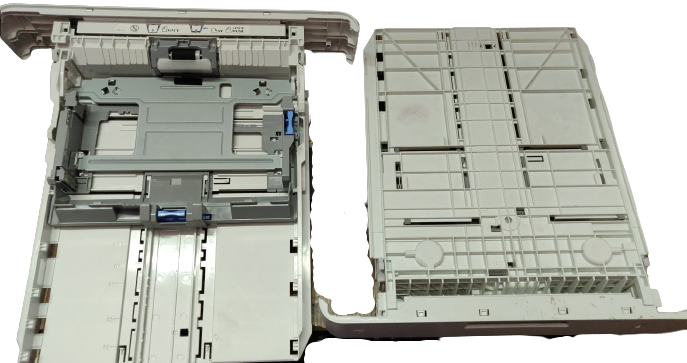
Compatible Printers :- Canon image Class LBP214dw / LBP226dw / LBP215x / LBP246dw II / LBP248x II / LBP248x / LBP246dw / LBP243dw Monochrome Laser Printer
Canon MF445dw / MF465dw / MF424dw / MF426dw / MF469x II / MF469x / MF461dw / MF465dw II Multi-function Monochrome Laser Printer
Canon image Class LBP214 / LBP226 / LBP215 / LBP246 / LBP248 / LBP246 / LBP243 Monochrome Laser Printer
Canon Image Class MF445 / MF465 / MF424 / MF426 / MF469 / MF461 Multi-function Monochrome Laser Printer
Canon image Class Image Class LBP 214dw / LBP 226dw / LBP 215x / LBP 246dw II / LBP 248x II / LBP 248x / LBP 246dw / LBP 243dw Monochrome Laser Printer
Canon Image Class MF 445dw / MF 465dw / MF 424dw / MF 426dw / MF 469x II / MF 469x / MF 461dw / MF 465dw II Multi-function Monochrome Laser Printer
Part Condition :- Import
Part Warranty :- No Replacement - No Warranty - Non Returnable Item
The "Catcher" of Your Printer
Think of the Paper Receiving Tray (commonly called the Paper Output Tray or Paper Holding Tray) as the catcher's mitt for your printer.
After your machine finishes printing, copying, or scanning, the paper shoots out at high speed. This tray is the structural component located at the front or top of your printer designed to catch, hold, and neatly stack your freshly printed documents so they don't fly off onto the floor or scatter across your desk.
What It Does (In Simple Words)
Though it looks like a simple piece of plastic, this tray plays an important role in keeping your workspace organized.
|
Function
|
What It Safely Does
|
|
1. Catches High-Speed Sheets
|
Stops the pages as they slide out of the delivery rollers.
|
|
2. Neatly Stacks Multi-Page Jobs
|
Keeps a 10, 20, or 50-page document perfectly stacked in numerical order.
|
|
3. Extends and Retracts
|
Most Paper Sheet Trays feature a pull-out extension flap to support longer paper sizes like Legal or A4.
|
|
4. Saves Desk Space
|
Can be folded upward or pushed inside when the printer is not in use.
|
Common Reasons Customers Need a Replacement Tray
Since these trays are made of lightweight plastic and extend outside the main body of the machine, they are highly prone to accidental damage. Customers usually buy a new Paper Sheet Receiving Tray for these reasons:
-
Accidental Snaps & Breaks: Someone walked past the printer and accidentally bumped into the extended tray, snapping the plastic hinges.
-
Missing Extension Flaps: The small pull-out plastic tip (flip-piece) at the end of the Paper Hold Tray has gone missing, causing long papers to drop straight to the floor.
-
Sagging or Drooping: Over time, heavy multi-page print jobs or heat from the fuser can warp the plastic, making the Paper Receive Tray loose and unstable.
Buying Tip for Customers:
Paper trays are NOT universal. Every printer series (such as HP LaserJet, Canon LBP, or Epson EcoTank) uses a uniquely shaped hinge and locking clip. Before clicking "Add to Cart," please cross-check your exact printer model number with our compatibility list to ensure a perfect, snap-in fit.
Why Buy From Us?
We stock 100% genuine, heavy-duty, and brand-new Paper Output Tray replacements. Our trays are molded from premium durable ABS plastic, ensuring they clip effortlessly into your printer's factory slots and withstand thousands of pages without sagging or snapping