
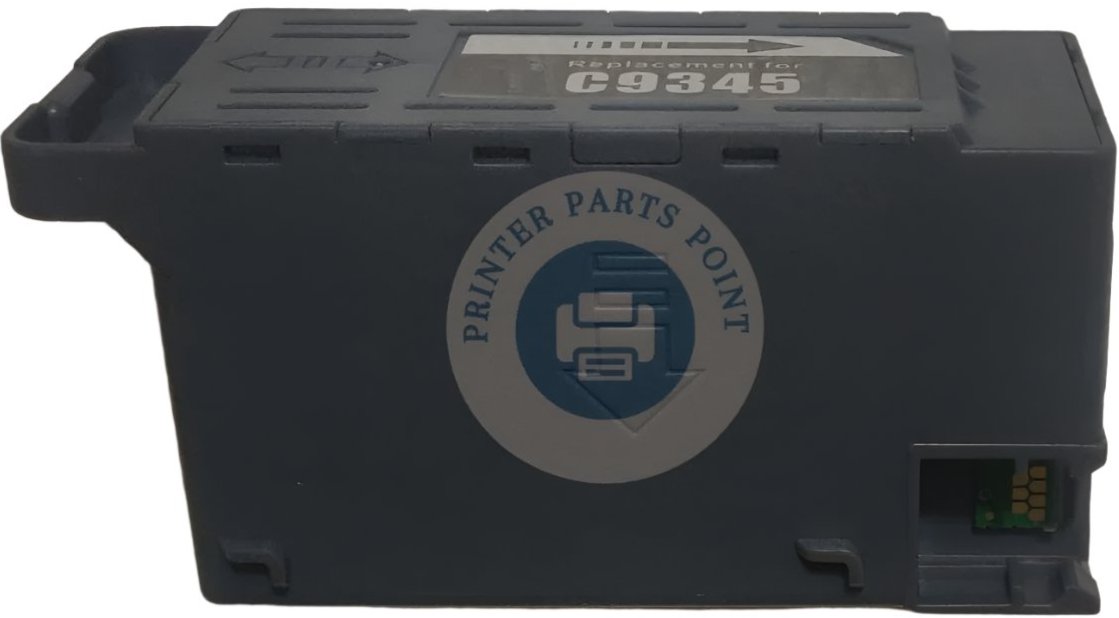

Description
Compatible Model :- Epson EcoTank L15150 / L8050 / L18050 / L8180 / L15160 / L11160 / L8160 / L6550 / L6570 / L6580 / ET-5800 / ET-5850 / ET-5880 / ET-16600 / ET-16650 / ET-8500 / ET-8550 / WF-7820 / WF-7830 / WF-7840DTWF / WF-7845 / WF-7820 / WF-7820 / WF-7848 / WF-7830DTWF / WF-7835DTWF/ ST-C8000 / ST-C8090 / M15140 / M15146 / M15147 Ink Tank Printer
Epson EcoTank L 15150 / L 8050 / L 18050 / L 8180 / L 15160 / L 11160 / L 8160 / L 6550 / L 6570 / L 6580 / ET5800 / ET5850 / ET5880 / ET16600 / ET16650 / ET8500 / ET8550 / WF7820 / WF7830 / WF7840DTWF / WF7845 / WF7820 / WF7820 / WF7848 / WF7830DTWF / C 9345 / WF7835DTWF/ STC8000 / STC8090 / M 15140 / M 15146 / M 15147 Ink Tank Printer
Part Condition :- New Compatible - New Import High Quality
Part Warranty :- No Replacement - No Warranty - Non Returnable Item
The "Waste Sponge & Memory" of Your Printer
Every time your printer cleans its head, flushes the nozzles, or initializes, it pumps out extra, unused ink. Instead of leaking inside your machine, this ink is collected safely inside a sponge-filled container called the Waste Ink Pad. The smart Ink Maintenance Box Chip attached to it talks to the printer's brain, counting exactly how much waste ink has been collected so it doesn't overflow onto your desk.
What It Does (In Simple Words)
This unit is a critical safety system hidden at the bottom or back of your inkjet/ink tank printer.
|
Step |
What It Safely Does |
|
1. Collects Excess Ink |
The internal pads absorb all the liquid waste ink during automatic head cleaning cycles. |
|
2. Tracks Usage |
The micro-chip securely monitors the ink level so the box never leaks or overflows. |
|
3. Locks for Safety |
When full, the chip tells the printer to temporarily lock up, preventing severe internal liquid damage. |
|
4. Resets with New Chip |
Replacing the box or installing a fresh Cartridge Reset Chip-Chip instantly unlocks the printer. |
Common Signs Your Maintenance Box or Chip Needs Replacing
Inkjet printers are pre-programmed to stop working once the waste pads hit 100% capacity. Customers usually buy a replacement when they see these sudden warnings:
- "Service Required" Error: A pop-up on your computer or printer screen saying, "A printer's ink pad is at the end of its service life."
- Maintenance Box Red Light: The printer stops printing completely, and a red light flashes next to the maintenance symbol.
- "Incompatible Cartridge" or Chip Error: If you cleaned the physical pad but didn't replace the tracking sensor, you will need a new Ink Maintenance Box Chip to clear the error.
Ink Leaking from Bottom: If someone bypassed the sensor without replacing the pads, physical waste ink might start pool-leaking under the machine.
Important Tip for Customers:
Simply washing the old waste sponge with water will NOT fix your printer! The printer relies entirely on the digital memory inside the smart chip. To get your machine running again, you must replace either the complete Maintenance Cartridge With Chip or install a brand-new Cartridge Reset Chip-Chip onto your existing box to reset the internal counter to 0%.
Think of the Waste Pad Box With Chip (commonly known as the Maintenance Cartridge With Chip or Waste Ink Pad With Chip) as the trash can and digital counter for your ink tank printer
Why Buy From Us?
We supply 100% stable, high-capacity Waste Ink Pad With Chip assemblies and premium Cartridge Reset Chips. Our chips are equipped with the latest upgraded firmware version to guarantee instant recognition, zero error codes, and a 100% full lifecycle reset for your Epson or Canon printers.
