
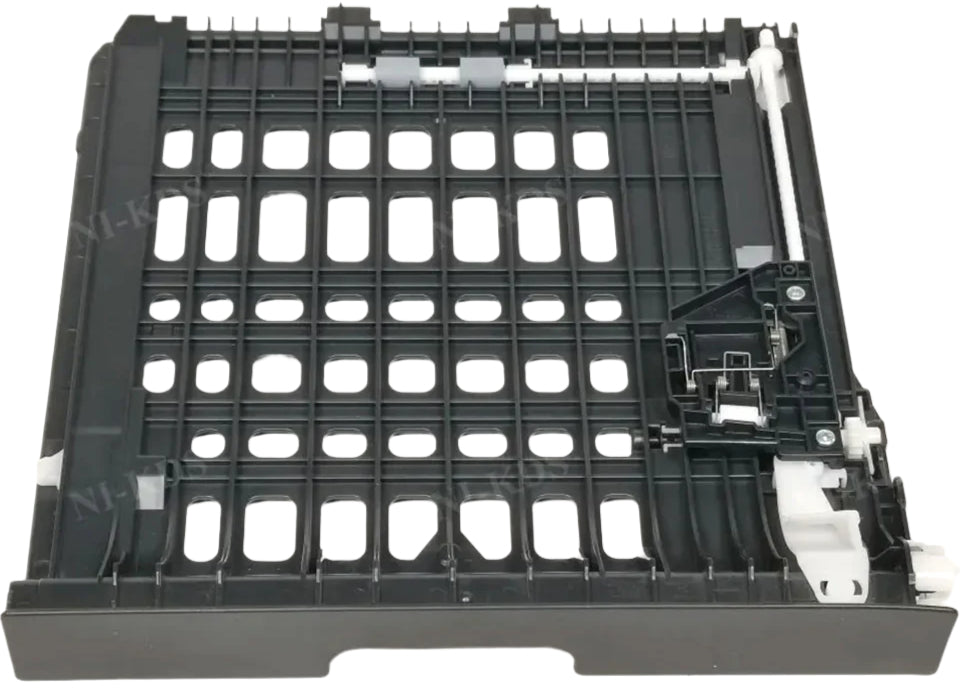

Description
Compatible Model :- Brother HL-L5100dn / L5500d / L5600dn / L5650dn / L5580d / L5585d L5590dn / L5000d / L5200dw / L6200dw / L6250dw / L6300dw / L5750dw / L5800dw / L5850dw / L5900dw / L6700dw / L6750dw / L6800dw / L6900dw Business Laser Printer
Brother HL-L5100 / L5500 / L5600 / L5650 / L5580 / L5585 / L5590 / L5000 / L5200 / L6200 / L6250 / L6300 / L5750 / L5800 / L5850 / L5900 / L6700 / L6750 / L6800 / L6900 Business Laser Printer
Brother HL 5100dn / 5500d / 5600dn / 5650dn / 5580d / 5585d / 5590dn / 5000d / 5200dw / 6200dw / 6250dw / 6300dw / 5750dw / 5800dw / 5850dw / 5900dw / 6700dw / 6750dw / 6800dw / 6900dw Business Laser Printer
Brother HL-5100 / 5500 / 5600 / 5650 / 5580 / 5585 / 5590 / 5000 / 5200 / 6200 / 6250 / 6300 / 5750 / 5800 / 5850 / 5900 / 6700 / 6750 / 6800 / 6900 Business Laser Printer
Part Condition :- Import
Part Warranty :- No Replacement - No Warranty - Non Returnable Item
The "U-Turn" System of Your Printer
When you select "Print on Both Sides" (Double-sided / Duplex printing) on your computer, you don't need to manually flip the paper. Instead, this smart mechanism catches the paper after side one is printed, pulls it backward, flips it upside down through a hidden path, and feeds it back into the printer to print on side two. It is the ultimate time, paper, and money-saving component!
What It Does (In Simple Words)
The duplex system uses a precise combination of gears, sensors, and reverse rollers to handle automatic 2-sided printing.
|
Step |
What It Safely Does |
|
1. Side One Printing |
The paper passes through the fuser, completing the print on the front side. |
|
2. The Reverse Pull |
Instead of exiting, the Duplex Drive Unit gears kick in, reversing the rollers to pull the paper back inside. |
|
3. The Flip & Track |
The paper slides down into the Duplex Tray Unit or Paper Duplex Tray, making a perfect flip. |
|
4. Side Two Completion |
The Paper Duplex Assembly guides the sheet straight back to the registration rollers to finish the backside print. |
Common Signs Your Duplex Unit Needs replacing
because it involves complex reverse mechanical gears and timing sensors, it is highly prone to wear and tear. Customers usually look for a replacement when facing these symptoms:
- Continuous "Duplex Jam" Errors: Paper passes smoothly for single-sided prints, but the moment you try double-sided printing, it gets stuck instantly with a "Paper Jam in Duplexer" error.
- Loud Grinding Noises: Worn-out or broken plastic gears inside the Duplex Drive Unit will make a terrible clicking or grinding noise when trying to reverse the paper.
- Skewed or Crooked Backside Prints: If the pick-up rollers inside the Duplex Print Tray are worn out unevenly, the second side of your page will come out tilted, creased, or wrinkled.
-
Printer Doesn't Recognize Duplexer: The printer screen displays "Duplex Unit Missing" or "Install Duplexer" even though the unit is physically inside the machine.
Buying Checklist for Wholesale & Retail Customers:
Duplex units are highly model-specific. A unit for an HP LaserJet Pro M402/M404 will not fit into a color printer or a different series. Always check the exact physical design, connecting pins/ports, and your printer model configuration before finalizing your purchase to ensure seamless automatic double-sided printing.
Think of the Duplex Assembly (commonly known as the Duplex Drive Unit or Paper Duplex Unit) as a high-tech automatic U-turn track inside your printer.
Why Buy Our Tested Duplex Assemblies?
We supply 100% genuine, warehouse-tested Duplex Assembly units and Duplex Drive Units. Every part undergoes comprehensive mechanical gear rotation and sensor response checks. Replacing your weak or worn-out unit completely removes recurring double-sided paper jams and restores smooth, high-speed office workflow.
